Messaging programme
What LEXICERA texts from (904) 567-9255, and to whom.
Perceived sender: LEXICERA. Every message opens "LEXICERA:" and is sent from LEXICERA's own number under LEXICERA's own brand and campaign. The law firm is never the sender; it is named only as the subject of a notice.
LEXICERA is the sender of every text message described on this page. It sends one kind of message: a notice that a law firm billing through LEXICERA has issued an invoice to you, with the secure link to view and pay it — and it sends it only to a person who has opted in, themselves, on a LEXICERA page. The firm is named in the message as the subject of the notice. It does not send the message, cannot compose, schedule or address one, and has no access to the number.
Effective 17 September 2026. Sender: LEXICERA, operated by LEXICERA LLC. Sending number (904) 567-9255, a local number registered to LEXICERA.
One
The programme
| Perceived sender | LEXICERA, operated by LEXICERA LLC. Every message begins "LEXICERA:" and is sent from LEXICERA's own number under LEXICERA's own 10DLC brand and campaign. The law firm is never the sender and is named only as the subject of a notice; no firm can compose, schedule or address a message, and no firm has access to the number. |
|---|---|
| What firms are told | When a law firm signs up, its onboarding page tells it in writing that LEXICERA, its billing software, is the sender of any texts its clients receive, from LEXICERA's number, and only to clients who opt in themselves. |
| Whose pages these are | LEXICERA is not a carrier for someone else's message. It issues the invoice and hosts it, the link in every message opens a page LEXICERA builds, hosts and operates, and the payment is made on that page. The mobile number and the consent were collected by LEXICERA, on LEXICERA's own pages, and given to LEXICERA - no law firm can compose, schedule or address a message, and no firm has access to the number. |
| Use case | Transactional account notification: an invoice from the client's firm is ready, with the secure link to view and pay it, plus the confirmation text that follows an opt-in. No promotional content of any kind. |
| Volume | Low. One message when a firm issues an invoice to that client. Payment reminders are never texted. |
| Consent | Express opt-in only, given by the client themselves on a LEXICERA page: an unchecked, optional box in the client portal, on the engagement-letter signing page, or on an invoice payment page. The number, the exact wording, the time and the IP address are stored. A number that is merely on file is never texted, and no firm or staff member can opt a client in. |
There is no marketing programme, no newsletter and no promotional send under this registration, and none is planned. A message is never sent to anybody who has not opted in to it.
Two
The consent this rests on
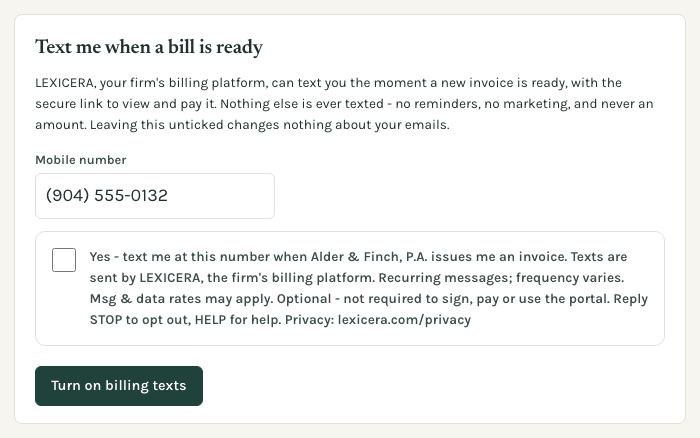
Express opt-in, and nothing else. A person receives texts from LEXICERA only after ticking an unchecked, optional box on one of LEXICERA’s own pages. There are three such places, and they are the whole of the consent model. The sentence beside the box is the same on all three:
Yes - text me at this number when [Firm name] issues me an invoice. Texts are sent by LEXICERA, the firm's billing platform. Recurring messages; frequency varies. Msg & data rates may apply. Optional - not required to sign, pay or use the portal. Reply STOP to opt out, HELP for help. Privacy: lexicera.com/privacy
Ticking it stores the mobile number, that exact wording, the time and the originating IP address. The record cannot afterwards be edited or deleted.
One — In the LEXICERA client portal
Signed in, the client sees the mobile number on their account, can correct it, and ticks an unchecked box. The section is headed “Text me when a bill is ready”.
Two — When signing an engagement letter
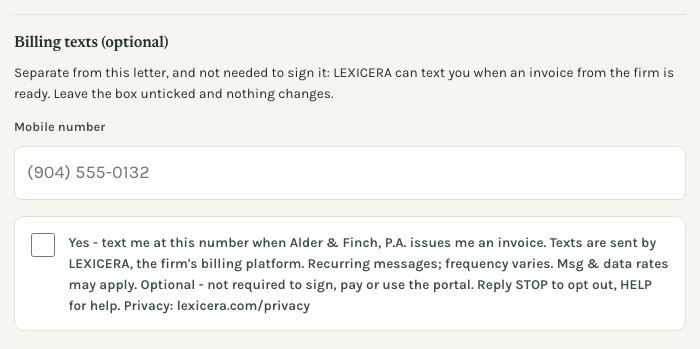
On the LEXICERA page where the client e-signs a letter from their firm, a separate, optional section below the letter asks for a mobile number and offers an unchecked box. It is not part of the letter and signing does not require it. The section is headed “Billing texts (optional)”.
Three — On an invoice payment page
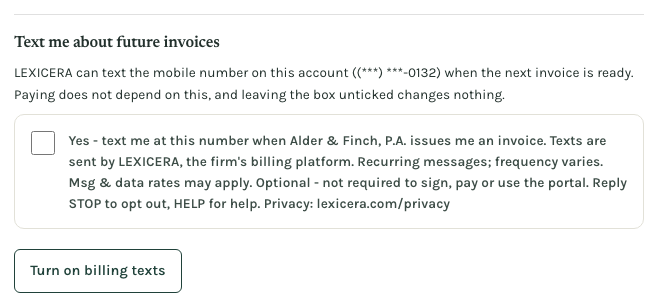
On the LEXICERA page where an invoice is paid, the client can confirm the number on their account (shown masked) by ticking an unchecked box. Paying does not require it. The section is headed “Text me about future invoices”.
What is not consent
A mobile number that is merely on file — in a firm’s client records, on a billing record, or anywhere else — is never texted. The software refuses the send by name when no opt-in exists for that number. Numbers are never bought, rented or imported. No firm and no member of a firm’s staff can opt a client in, and neither can anyone at LEXICERA: only the person holding the phone can tick the box. Staff see this line under every field where a client’s mobile number is entered, so nobody entering one is left believing otherwise:
Entering a mobile number does not sign this client up for texts. LEXICERA texts a client only after the client opts in themselves - in their portal, when signing an engagement letter, or on an invoice payment page.
Three
The confirmation text
The first text a number receives after its holder opts in is this confirmation, sent on its own before any invoice text. It repeats every required disclosure on the handset itself:
LEXICERA: You'll get billing texts here about your account with [Firm name], sent by LEXICERA, the firm's billing platform. Frequency varies. Msg & data rates may apply. Reply STOP to opt out, HELP for help. Privacy: lexicera.com/privacy
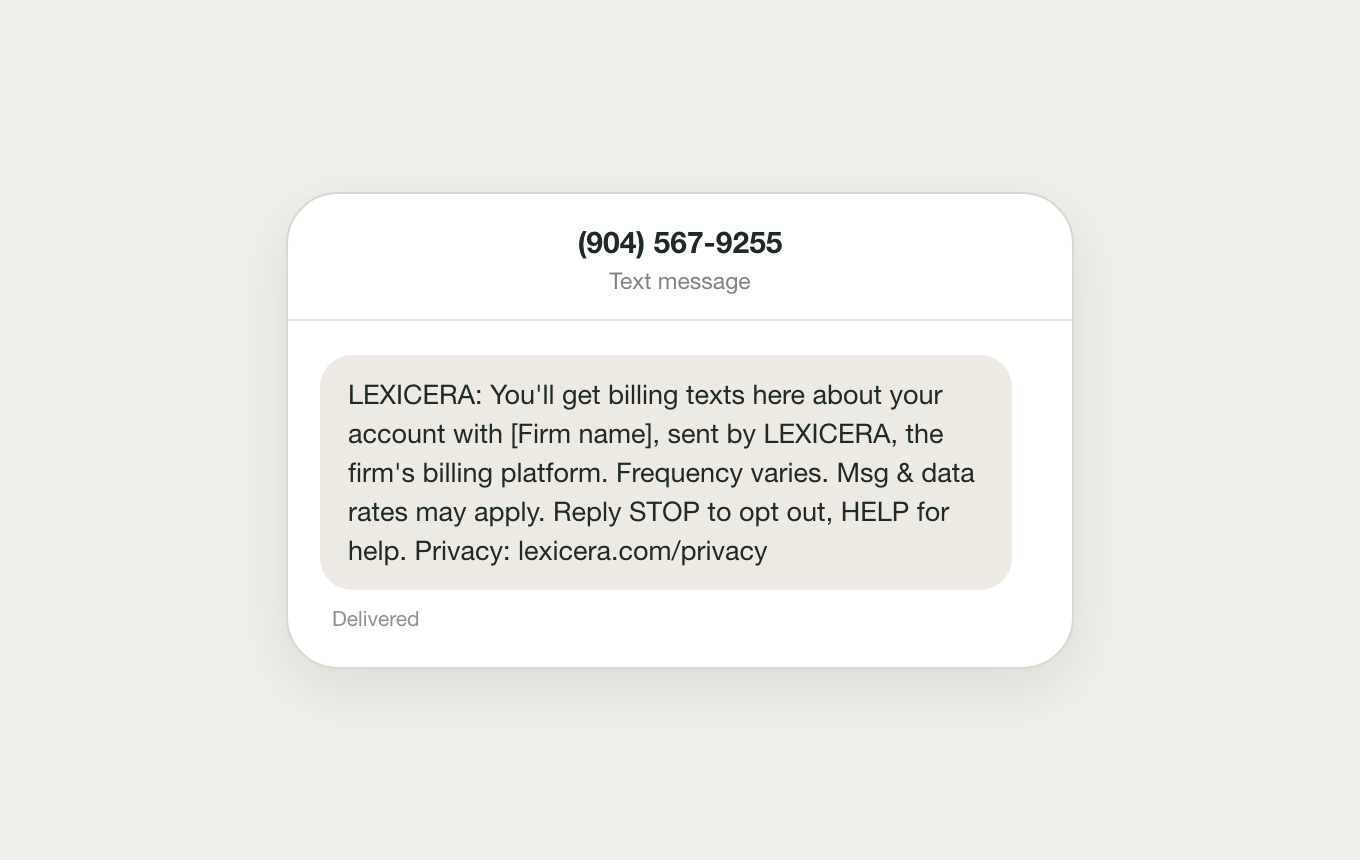
If the confirmation cannot be delivered, the invoice text is held back too, and both are tried again later. If the recipient replies STOP, they are opted out at the carrier immediately, and the platform additionally records the opt-out so that number is never queued again — described below.
Four
What a message says
An invoice notice begins “LEXICERA:”, names the firm that issued the invoice and the invoice number, carries the secure link to view and pay it, and ends with the opt-out sentence. It deliberately names no amount: the sum is on the invoice behind the link, and a text naming a figure would put a client’s bill on a lock screen.
LEXICERA: [Firm name] has issued invoice 2026-0107 to you. View and pay securely: my-[firm].lexicera.com/pay/… Reply STOP to opt out.
The link in a real message is a full https address on that firm’s LEXICERA client portal, carrying a single-use token. Payment reminders are never texted — only the first notice for an invoice can be, and that is enforced in the code rather than by a setting. Message frequency therefore follows the firm’s billing activity and nothing else.
Five
STOP, HELP and START
These are answered at the number itself, from the messaging profile’s opt-out configuration — not by anything that depends on our software. That matters: an opt-out takes effect against the number whatever this platform does next. This number is outbound only and there is nobody reading replies here; the HELP reply says where a person can be reached.
| Reply | What comes back |
|---|---|
| STOP STOP, STOPALL, UNSUBSCRIBE, CANCEL, END, QUIT | LEXICERA: You are opted out of billing texts and will receive no further messages. Reply START or UNSTOP to resume. |
| HELP HELP, INFO | LEXICERA billing texts about your law firm's invoices. Message frequency varies. Msg & data rates may apply. Help: brad@lexicera.com. Reply STOP to opt out. |
| START START, YES, UNSTOP | LEXICERA: You are opted back in to billing texts. Reply STOP to opt out, HELP for help. |
Some mobile carriers also send their own standard acknowledgement, which cannot be customised and which names UNSTOP. Both resume keywords work, and the STOP reply above names both so a recipient reading two messages is not given two different answers.
Beyond the carrier’s own suppression, the platform reads that opt-out list and records it against the client, so a client who has replied STOP is never queued for a message at all — the send is refused by name before anything is composed. That state clears only when the carrier’s list clears, which happens when the recipient texts START or UNSTOP. No firm and no member of our staff can clear it.
Six
The six CTIA elements, and where each one lives
| Element | Where it appears |
|---|---|
| Use-case / program description | This page; the opt-in box on all three surfaces; the confirmation text |
| "Message frequency varies" | The opt-in box, the confirmation text, and the HELP reply |
| "Msg & data rates may apply" | The opt-in box, the confirmation text, and the HELP reply |
| Reply STOP to opt out | Every message the platform composes, the opt-in box, and the STOP reply |
| Reply HELP for help | The opt-in box and the confirmation text |
| Privacy policy link | lexicera.com/privacy, in the opt-in box and the confirmation text |
Seven
Where a number goes
A mobile number is passed to our messaging carrier for the sole purpose of delivering the messages described above, and to nobody else for any purpose. It is not sold, not licensed, not traded, and not used to build any audience, segment or list. The privacy policy states that in the terms carriers ask for and lists every vendor that touches anything; the terms of service set out what a firm confirms when texting is switched on for it — which is a precondition for texting that firm’s clients, and never a substitute for the client’s own opt-in.
What a law firm is told when it signs up
Every firm’s onboarding page carries this notice, headed “Texts to your clients come from LEXICERA”:
LEXICERA, your billing software, is the sender of any text message your clients receive about an invoice. The texts come from LEXICERA's own number, open "LEXICERA:", and name your firm only as the firm that issued the invoice. Only clients who opt in themselves, on a LEXICERA page, are texted. Your firm does not send them and cannot compose, schedule or address one.
Whose pages these are
LEXICERA is not a carrier for someone else's message. It issues the invoice and hosts it, the link in every message opens a page LEXICERA builds, hosts and operates, and the payment is made on that page. The mobile number and the consent were collected by LEXICERA, on LEXICERA's own pages, and given to LEXICERA - no law firm can compose, schedule or address a message, and no firm has access to the number.
This registration covers transactional invoice notices, sent by LEXICERA, to people who opted in on a LEXICERA page. It does not cover marketing, solicitation, or texting any number that has not opted in. A marketing programme would be a separate filing, and there is not one.
Questions about this programme reach a person at brad@lexicera.com.